Power Connections from SMPS to Devices
There are 2 types of SMPS (Switch Mode Power Supply).
1) AT SMPS
2) ATX SMPS
AT SMPS
- Has 6+6=12 pin connector from SMPS to Mother board.
- The power supply connector having written P8 & P9.
- While connecting P8 & P9 connector from SMPS to mother board Black colors wire of P8 & P9 connector's co-inside each other.
ATX SMPS
- Comes with 20 Pin single connector, i.e. P1 connector from SMPS to mother Board.
 -AT motherboards uses the P8 and P9 power connector
 -ATX motherboard uses P1 power connectors and P4 power connector.
5. Mini Power Connector -used to supply power to floppy drives.

There are 2 types of SMPS (Switch Mode Power Supply).
1) AT SMPS
2) ATX SMPS
AT SMPS
- Has 6+6=12 pin connector from SMPS to Mother board.
- The power supply connector having written P8 & P9.
- While connecting P8 & P9 connector from SMPS to mother board Black colors wire of P8 & P9 connector's co-inside each other.
ATX SMPS
- Comes with 20 Pin single connector, i.e. P1 connector from SMPS to mother Board.
POWER CONNECTOR
1. AT power connector
-AT motherboards uses the P8 and P9 power connector-When connecting the P8 and P9 keep the black wire together.
2. ATX Power connector
-ATX motherboard uses P1 power connectors and P4 power connector.-Latest boards uses (24pin) P1 and P4 Power connector.
3. PATA power connector
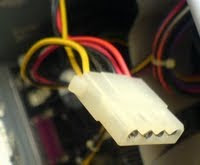 -For PATA drives we need to connect white Molex connector.
-For example PATA hard disk, CD/DVD Drive.
3. PATA power connector
-For PATA drives we need to connect white Molex connector.-For example PATA hard disk, CD/DVD Drive.
4. SATA power connector
 -For SATA drives we need to connect black Molex connector.
-For SATA drives we need to connect black Molex connector. 5. Mini Power Connector
-used to supply power to floppy drives.DATA CABLES
34 Pin Connector
- 34 Pin connector on Mother Board to connect Floppy Disk drive (FDD).
- Through single 34 Pin connector, We can connect two Floppy Disk Drive.
- To connect FDD to Mother Board, We use Flat Ribbon Cable.

- 34 Pin connector on Mother Board to connect Floppy Disk drive (FDD).
- Through single 34 Pin connector, We can connect two Floppy Disk Drive.
- To connect FDD to Mother Board, We use Flat Ribbon Cable.
40 Pin Connector (PATA)
- On Mother Board there are two 40 Pin connector to connect Hard Disk(HD), CD-ROM Drive, CD-R/W Drive.
- Through single 40 Pin connector, We can connect 2 devices.
- On Mother Board there are two 40 Pin connector to connect Hard Disk(HD), CD-ROM Drive, CD-R/W Drive.
- Through single 40 Pin connector, We can connect 2 devices.


