This is the simple but secret method of hiding any files and folder using BAT extension. We will create 2 bat files hide.bat and unhide.bat Just copy the following codes:
Step 1.
- Open notepad then paste the following codes
- save as hide.bat
(note:you can save it to any name but extension must be .bat)
attrib +h +a +s *.*
attrib -h -a -s unhide.bat
Step 2
- Open note pad, paste following codes
- save as unhide.bat
attrib -h -a -s *.*
Step 3
After that copy both hide.bat and unhide.bat file to your private folder, where you want to hide files/folder.
Just click hide.bat it will hide everything except unhide.bat And click unhide it will unhide all.
This trick is done using DOS command. You can also remove/copy/move and do lots of things using other DOS commands in the same ways.

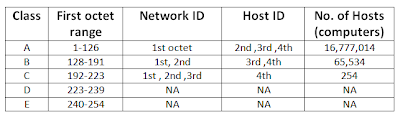
 Every computer in the network must have the same network ID and unique Host ID (different Host ID). If the network ID is different the communication will not occur and if Host ID were to be same then communication will not occur.